


AI & Data Fundamentals
What Is Intelligent Document Processing (IDP)? A Complete Guide
What Is Intelligent Document Processing?
Intelligent document processing, or IDP, uses AI to pull information out of documents and act on it. The document can be a PDF, a scan, an email, or a handwritten form. Companies produce documents in enormous volumes, in every shape. Handling them by hand is slow and error-prone. The bottlenecks it creates stay invisible until something breaks.
A simple example makes the case well: imagine a workflow that automatically reorders stock when inventory runs low. The order itself is automated, but nothing actually ships until the supplier is paid. Say the supplier's invoice arrives by email. Someone has to key that data into the accounting system before payment goes out. That single manual step now paces the whole automated process. IDP removes that step by automatically extracting the invoice data and entering it into the system in the right format.
IDP combines OCR, natural language processing, machine learning, and automation. Together they read the document, work out what it says, and route the result to the systems that need it. This is more than basic OCR or simple document handling. IDP does not just digitize text. It reads context, sorts documents by type, and adapts as formats change.
What IDP Is Not
It's easier to understand IDP by being clear about a few common mix-ups:
- IDP is not just OCR. OCR converts an image of text into machine-readable characters, but it has no understanding of what that text actually means. IDP uses OCR as one component among several, layering AI and machine learning on top to interpret content, not just digitize it.
- IDP is not robotic process automation (RPA). RPA automates repetitive, rule-based actions, like entering data into a system, but it can't interpret unstructured content on its own. IDP is what lets an RPA workflow understand document content well enough to act on it. The two complement each other rather than compete.
- IDP is not the same as a general-purpose conversational AI model. A chat-based language model generates human-like text responses. IDP is built for one job: reading, classifying, and extracting structured data from documents. It uses OCR and NLP with validation logic on top. The two share language technology but not purpose.
How Does Intelligent Document Processing Work?
Most IDP systems follow a similar pipeline, even though the specific tools and models vary by vendor:
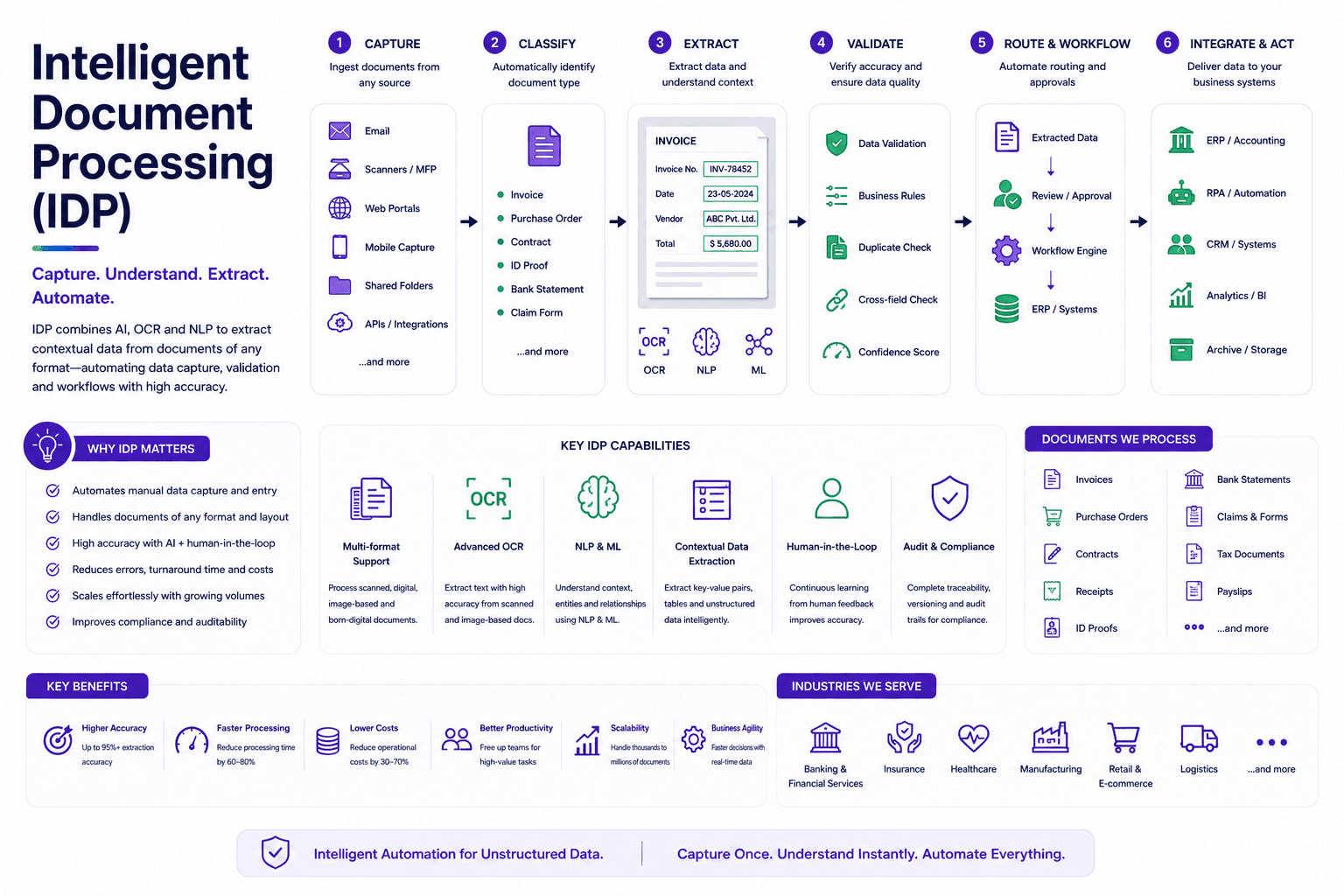
- Document ingestion. Documents enter the system from multiple channels: email, scans, mobile photos, online forms, and more.
- Preprocessing. The system cleans up the input, improving image quality and preparing it for accurate reading.
- Optical character recognition. Text in the document is converted into machine-readable characters.
- Document classification. A trained model works out what it is looking at, from patterns in layout and content. Invoice, contract, claim form. Getting this step right determines everything that follows, since it decides which fields to look for and which rules to apply.
- Data extraction. Using NLP and layout analysis, the system pulls out the specific fields that matter: names, dates, totals, account numbers, and more.
- Data validation. Extracted data gets checked for accuracy, often by cross-referencing existing records or applying predefined rules. When the system isn't confident, it can flag the item for a human reviewer instead of guessing.
- Data structuring. Once validated, the data is converted into a standard, structured format that downstream systems can actually use.
- Workflow integration. The structured data lands in your business systems: ERP, CRM, accounting platform. That triggers the next step on its own.
A well-built IDP system keeps learning. It takes in corrections and adapts to new formats, so accuracy climbs the longer it runs. Manual intervention drops with it.
IDP vs. Automated Document Processing (ADP)
It's worth distinguishing IDP from simpler, rules-based automated document processing:
| Automated Document Processing (ADP) | Intelligent Document Processing (IDP) | |
|---|---|---|
| Primary function | Digitizes and stores documents | Extracts and interprets meaning from documents |
| Technology | Rule-based automation | AI, machine learning, NLP, OCR, RPA |
| Document types handled | Mostly structured, predictable formats | Structured, semi-structured, and unstructured |
| Data extraction | Limited or manual | Automated and context-aware |
| Adaptability | Struggles with format variation | Learns and adapts over time |
ADP handles predictable, standardized documents well. It breaks down as soon as formats vary, which is where reading context earns its keep.
Technologies Behind IDP
Optical Character Recognition (OCR)
OCR turns pictures of text into machine-readable text. Scanned pages, photos, PDFs. It is usually the first step in any IDP pipeline. A few variations exist depending on the document type:
- Simple OCR matches text images against stored character templates, commonly used for straightforward printed text.
- Intelligent character recognition (ICR) uses machine learning to read handwritten or more complex characters.
- Intelligent word recognition (IWR) works at the whole-word level rather than character by character, useful for cursive handwriting or less structured forms.
- Optical mark recognition (OMR) detects marks, checkboxes, or symbols rather than text, common in surveys, ballots, or multiple-choice forms.
Natural Language Processing (NLP)
NLP lets a system interpret the actual meaning behind text, not just recognize characters. It helps identify entities, relationships, and context, which is essential for anything beyond the simplest structured forms. NLP draws on three things. Machine learning models trained to spot language patterns. Deep learning for the more complex relationships across large volumes of text. Computational linguistics for grammar and syntax.
Robotic Process Automation (RPA)
RPA does not read documents itself. It is paired with IDP to act once the data is out: entering it into systems, triggering the next workflow, or flagging exceptions for a person to check.
Benefits of Intelligent Document Processing
- Increased accuracy. Automated validation and rules-based cross-checking reduce the human error that comes with manual data entry.
- Lower operational costs. Reducing manual labor and rework tends to produce meaningful cost savings over time, especially for companies processing high volumes of documents.
- Improved efficiency. A document that took minutes by hand can be handled in seconds. Feeding the data straight into business systems removes the manual handoff too.
- Greater scalability. Automated processing can absorb growing document volumes without a proportional increase in headcount, which matters especially during demand spikes.
- Higher employee productivity. Freeing people from repetitive data entry lets them focus on higher-value work like analysis and customer engagement.
- Better customer experience. Faster processing translates into faster approvals, claims handling, and onboarding, with fewer errors like incorrect billing along the way.
Common Use Cases
- Healthcare — organizing patient records, processing insurance claims, and extracting data from lab reports and clinical documentation.
- Finance — automating invoice processing, expense reports, and payment workflows by extracting amounts, dates, and vendor information.
- Legal — analyzing contracts to extract key clauses, terms, and obligations, and organizing case documentation for faster review.
- Logistics — processing shipping documents, customs forms, and delivery receipts to reduce errors and speed up shipment tracking.
- Human resources — extracting candidate information from resumes, standardizing applications, and processing payroll and onboarding paperwork.
- Insurance — extracting claims data, validating policy details, and routing documentation for faster claims approval.
- Banking and financial services — streamlining loan and mortgage applications, which often involve dozens of supporting documents, by automatically capturing and validating the required information.
- Government and public sector — speeding up processing for permits, licenses, and social program enrollment, where manual, spreadsheet-based review has traditionally been a major bottleneck.
Challenges of Implementing IDP
- Document variability. Formats, layouts, and languages vary enormously between vendors and document types, which makes consistent extraction genuinely difficult.
- Model training and maintenance. IDP models need a lot of labeled data, and domain expertise to label the fields correctly. They also need monitoring and retraining as formats shift and new document types appear.
- System integration. Getting the data to flow cleanly into an existing ERP, CRM, or accounting system takes real work. Expect data mapping and workflow changes, not plug and play.
- Accuracy on unstructured content. The less structured the document, the harder consistent accuracy becomes. That is why human review is still normal for edge cases and high-stakes decisions.
How to Evaluate IDP Software
A structured evaluation usually covers:
- Document compatibility — can it handle the range of formats, languages, and structures (structured, semi-structured, unstructured) your organization actually deals with?
- Extraction accuracy — test it against real documents, checking OCR and NLP accuracy, table and line-item recognition, and confidence scoring on extracted fields.
- AI and learning capabilities — does it genuinely improve from corrections over time, and can it adapt to new document templates without a full retraining cycle?
- Integration — can it route data automatically into your existing systems and support human-in-the-loop review for exceptions?
- Scalability — can it handle both current volumes and future growth, including demand spikes, whether deployed in the cloud or on-premises?
- Governance and security — does it support encryption, role-based access control, and compliance with relevant industry regulations?
- Vendor support — how responsive is support, how often does the platform get updated, and what documentation and community resources are available?
Frequently Asked Questions
OCR converts images of text into machine-readable characters but has no understanding of meaning. IDP uses OCR as one component but adds AI and machine learning on top to classify documents, interpret context, and validate extracted data before routing it into business systems.
IDP extracts and interprets data from documents, including unstructured content. RPA automates repetitive, rule-based actions within a workflow, like entering data into a system. The two are often used together: IDP provides the "understanding," and RPA acts on it.
Yes, through technologies like intelligent character recognition (ICR) and intelligent word recognition (IWR), which are specifically designed to interpret handwriting rather than just printed text, though accuracy can vary depending on legibility and document quality.
IDP dramatically reduces manual data entry, but most real-world deployments still keep a human in the loop for edge cases, low-confidence extractions, or high-stakes decisions where errors would be costly.
Industries that handle large volumes of paperwork tend to see the biggest impact, including financial services, healthcare, insurance, logistics, legal, and government services, anywhere document-heavy processes create real bottlenecks.
A large language model is built to generate human-like text in response to prompts. IDP is purpose-built to read, classify, and extract structured data from documents using OCR and NLP together with validation and business-system integration, a more specialized and narrower task, even though the two share some underlying technology.

Turn this insight into your next move.
Tell us what you're building and we'll show you where uCube.ai actually fits — no generic demo, just a straight conversation about your data and your goals.